.avif)

SilverStripe CMS Store Locator: AI-Powered, SEO-Ready, Zero Code
Everything you need from a SilverStripe CMS store locator

AI Content Assistant
Stop writing location descriptions by hand. MapCosmos generates engaging, SEO-optimized content for every store, including local keywords, opening hours context, and product highlights, in seconds.

One-snippet embed
Add MapCosmos to any SilverStripe CMS page, block, or template with a single HTML snippet. No modules to install, no database migrations, no developer overhead.

150+ no-code customization options
Control layout, colors, map styles, filters, fonts, languages, and currencies. Every detail of your store locator can be tailored to match your brand, with no design experience or coding required.

Dedicated SEO pages for every location
Each store gets its own indexed page with AI-generated metadata, schema markup, and local keywords. Your locations start appearing in local search results, driving organic traffic without additional ad spend.

Rich location content and media
Showcase products, services, live reviews, photo galleries, team bios, downloadable menus or flyers, and custom map markers. Turn every location page into a conversion tool, not just a map pin.

Real-time analytics and live data sync
See exactly what customers search for, which locations get the most views, and where drop-off happens. Connect your CRM or inventory system to keep all location data accurate and up to date automatically.
Launch your SilverStripe CMS store locator today
Whether you run a small SilverStripe CMS site or a large multi-site network, MapCosmos scales with you. Start your free trial and launch your store locator today.
User Guide: Integrating a Store Locator in SilverstripeCMS
1.0 Overview
This guide provides MapCosmos users with the technical steps to integrate the MapCosmos store locator widget into a Silverstripe CMS project.
2.0 Prerequisites
Before beginning the integration, ensure you have the following:
- An active Silverstripe CMS installation.
- Administrator or developer-level permissions to modify Silverstripe page types and templates.
- A MapCosmos account with a fully configured store locator widget.
3.0 Integration Procedure
The integration is a two-stage process. First, the widget is configured in MapCosmos, and then the generated code is embedded into a Silverstripe template.
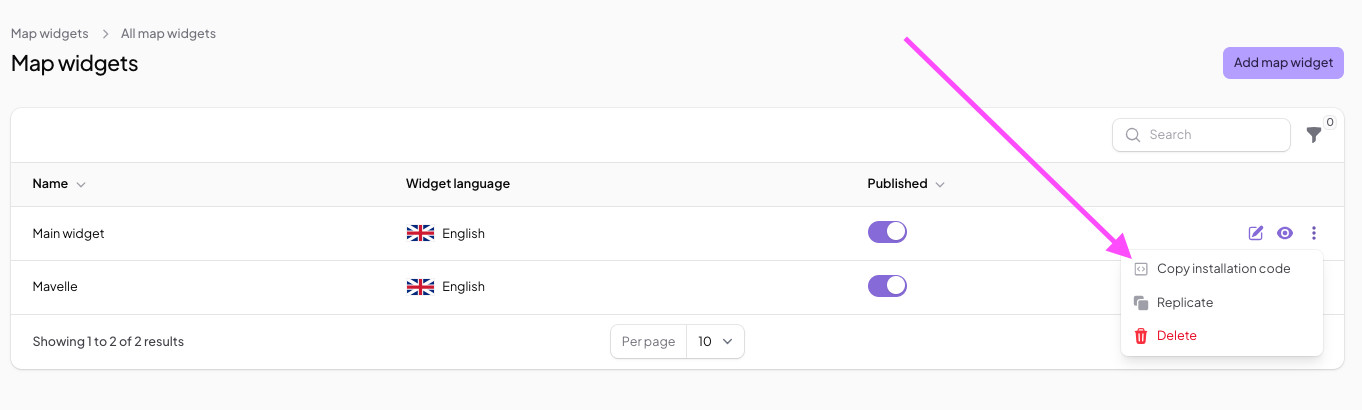
3.1 Copy the widget installation code from MapCosmos
You can generate the necessary embed code within the MapCosmos platform. For a comprehensive walkthrough of how to set up your MapCosmos widget, please refer to our detailed guide on generating the installation code.
3.2 Implementation in Silverstripe
- Create a Page Type: For best practice and maintainability, it is recommended to create a new page type in your Silverstripe project (e.g., StoreLocatorPage.php).
- Create the Page: In the Silverstripe CMS admin panel, create a new page using your StoreLocatorPage type.
- Embed in Template: Open the corresponding template file (e.g., StoreLocatorPage.ss). Paste the embed code copied from MapCosmos into the main content area of your template.
<%-- templates/Layout/StoreLocatorPage.ss --%>
<div class="container">
    <h1>Our Locations</h1>
    <p>Find a location near you.</p>

    <%-- Paste the MapCosmos embed code here --%>
</div>
4.0 Verification
After embedding the code, clear the Silverstripe cache by navigating to your site's URL and adding ?flush=1 to the end. View the new Store Locator page on the front end to confirm that the interactive map is loading and functioning as expected.
5.0 Enabled Functionality
Upon successful integration, your website's users will have access to a full-featured store locator where they can:
- Discover nearby stores instantly.
- Filter locations by specific products, services, categories, opening times, distance, and much more.
- Get one-click directions through online maps.
- Access customized, rich details about your local stores.