.avif)

Joomla Store Locator: AI-Powered, SEO-Ready, Zero Code
Everything you need from a Joomla store locator

AI Content Assistant
Stop writing location descriptions by hand. MapCosmos generates engaging, SEO-optimized content for every store, including local keywords, opening hours context, and product highlights, in seconds.

One-snippet embed
Add MapCosmos to any Joomla page, block, or template with a single HTML snippet. No modules to install, no database migrations, no developer overhead.

150+ no-code customization options
Control layout, colors, map styles, filters, fonts, languages, and currencies. Every detail of your store locator can be tailored to match your brand, with no design experience or coding required.

Dedicated SEO pages for every location
Each store gets its own indexed page with AI-generated metadata, schema markup, and local keywords. Your locations start appearing in local search results, driving organic traffic without additional ad spend.

Rich location content and media
Showcase products, services, live reviews, photo galleries, team bios, downloadable menus or flyers, and custom map markers. Turn every location page into a conversion tool, not just a map pin.

Real-time analytics and live data sync
See exactly what customers search for, which locations get the most views, and where drop-off happens. Connect your CRM or inventory system to keep all location data accurate and up to date automatically.
Launch your Joomla store locator today
Whether you run a small Joomla site or a large multi-site network, MapCosmos scales with you. Start your free trial and launch your store locator today.
How to Add a Store Locator to Your Joomla Website with MapCosmos
In today’s fast-paced digital world, people want quick answers - especially when looking for nearby stores, services, or pickup points. If you run a retail chain, service-based business, or franchise, adding a store locator to your Joomla website is one of the smartest things you can do.
It helps visitors find your physical locations in seconds, boosts your local SEO, and drives more foot traffic to your stores.
The best part? You don’t need any coding knowledge. With MapCosmos, you can create a custom, interactive store locator in minutes.
Why Add a Store Locator?
Store locators are more than just maps. They’re tools that guide users from “I need this” to “Here’s where I can buy it.”
🧠 Did You Know?
“88% of consumers who do a local search on their smartphone visit or call a store within 24 hours.”
- Think with Google
Having a store locator means:
- Customers don’t have to search through long lists of addresses
- They can get directions with one click
- You can show product or service availability by location
- You rank better in local search results
🔧 Step-by-Step: How do I install Store Locator Widgets on Joomla
Here’s how you can add MapCosmos to your Joomla site in 7 easy steps.
1. Create a Free Account on MapCosmos
Go to MapCosmos.com and sign up. No payment is needed to get started.
Once you’re in, you can create your first store locator.
2. Add or Upload Your Store Locations
You can:
- Add stores one by one (manually), or
- Use a spreadsheet (CSV or Excel) to upload them in bulk
Include details like:
- Store name
- Address
- Phone number
- Services offered
- Products
- Business hours
💡 Tip: During upload, MapCosmos helps you match your spreadsheet fields to the correct fields in the system. This is called field mapping and it saves you time. You can read about in a our the rticle: How to Import Locations into Your Store Locator with MapCosmos (Manual, CSV, API)
3. Customize the Widget Design
Make the map look like part of your site. You can:
- Change map colors, buttons, and fonts
- Add a radius search (e.g. 10 km from user)
- Choose which filters to show (city, category, service)
- Select the language
MapCosmos is fully mobile responsive and supports multilingual sites, perfect for Joomla.
4. Add Extra Info with Custom Fields
Go beyond the basics. You can add:
- Product or service availability
- Parking instructions
- Store photos
- PDF downloads (like brochures or menus)
- Contact buttons
- Accessibility info
All of this can show up per location, making the experience more useful and personal.
5. Get the Installation Code
Once your widget is ready:
- Go to the dashboard
- Click “Installation Code”
- Copy the HTML snippet provided
This is the code you’ll add to your Joomla website.
6. Add the Locator to Your Joomla Website
You can place the MapCosmos locator in a Custom HTML Module or inside an Article.
Option A: Use a Custom HTML Module
- Go to Extensions → Modules → New → Custom HTML
- Click the Code view button (<>)
- Paste your embed code
- Choose where the module should appear
- Save and publish
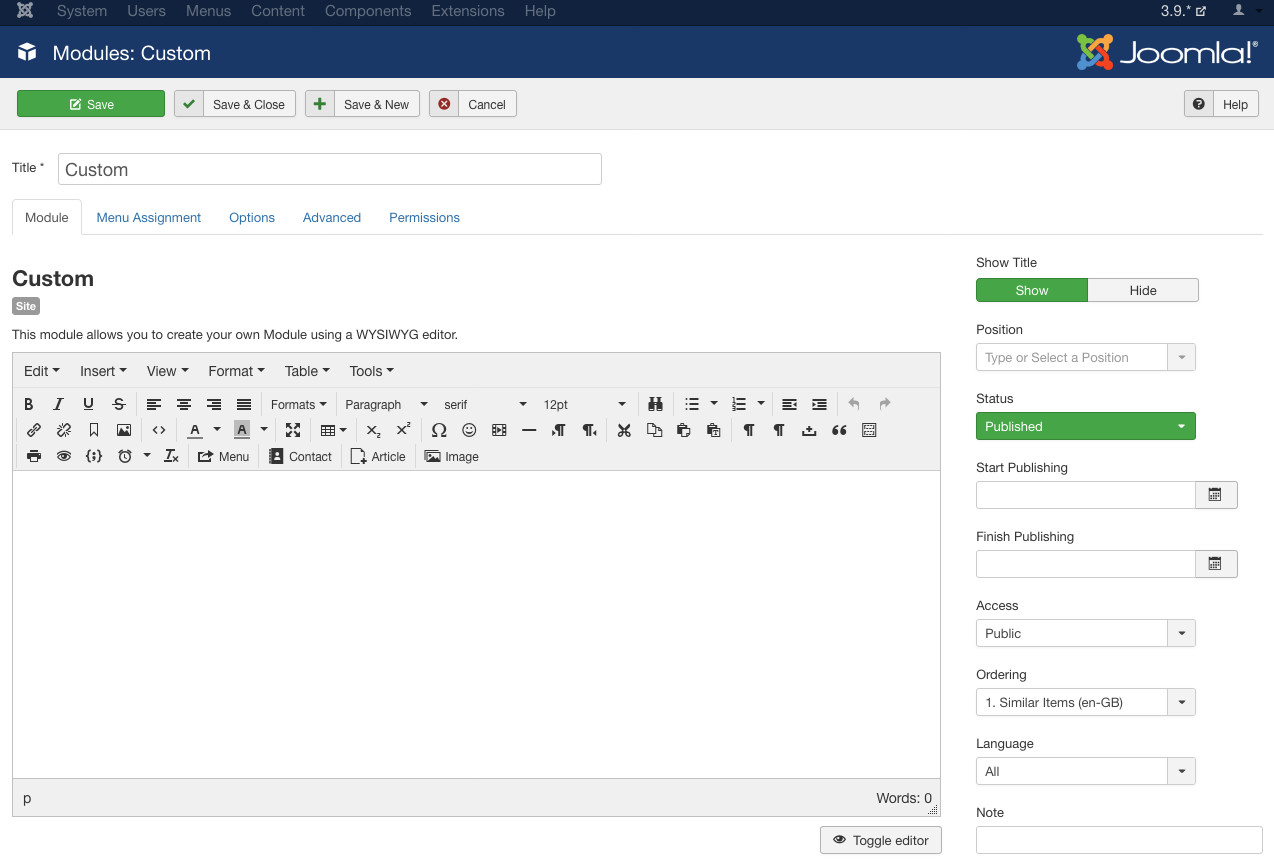
Option B: Insert into an Article
- Go to Content → Articles
- Create or edit an article
- Switch to code view
- Paste the embed code
- Save and publish
That’s it. You’re live!
If your Store Locator isn't working and only shows a message like "Store Locator loading", it’s likely that Joomla’s text editor is removing the <script> tags from the installation code.
To fix this, follow the instructions in this guide to prevent Joomla from stripping out script tags:
👉 How to Stop Joomla From Removing Script Code
7. Test and Optimize
Visit your site and test the store locator:
- Try searching by city, ZIP code, or keyword
- Check that maps load correctly on mobile and desktop
- Click to get directions or contact info
Ask your team or users to try it too - this helps you improve the experience.
🔍 Bonus: Boost Your Local SEO
Adding a store locator helps you show up in Google Maps, “near me” searches, and local listings.
Each location adds new, crawlable content to your site. MapCosmos also supports structured data, helping search engines better understand your store info.
🧠 “72% of customers, who search for local businesses, end up visiting stores with five miles. More than 50% of “near me” searches result in a store visit. ”
—-Think with Google
That’s real traffic, and real sales.
Use Cases
This setup works great for:
- Retail chains
- Restaurants or cafes
- Healthcare clinics
- Dealerships
- Pickup/drop-off points
- Service centers
🧠 SEO Keywords to Add
To make your locator page perform even better, include search-friendly terms like:
- "Find a store near me"
- "[Product] available in [City]"
- "Store locator for [Brand]"
- "Nearest [Service] location"
- "Store hours in [Location]"
Include these in your headlines, subheadings, and meta descriptions.
✅ Final Thoughts
A store locator makes your Joomla website more helpful, more local, and more valuable. With MapCosmos, you get a fast, clean, mobile-friendly solution that’s easy to manage.
No developers. No stress. Just results.
👉 Ready to Start?
Try MapCosmos for free and add a powerful, smart store locator to your Joomla site today.