.avif)

Jimdo Store Locator: AI-Powered, SEO-Ready, Zero Code
Everything you need from a Jimdo store locator

AI Content Assistant
Stop writing location descriptions by hand. MapCosmos generates engaging, SEO-optimized content for every store, including local keywords, opening hours context, and product highlights, in seconds.

One-snippet embed
Embed your store locator on any Jimdo page with a single HTML snippet. No plugins, no developer time, and full compatibility with Jimdo's editor.

150+ no-code customization options
Control layout, colors, map styles, filters, fonts, languages, and currencies. Every detail of your store locator can be tailored to match your brand, with no design experience or coding required.

Dedicated SEO pages for every location
Each store gets its own indexed page with AI-generated metadata, schema markup, and local keywords. Your locations start appearing in local search results, driving organic traffic without additional ad spend.

Rich location content and media
Showcase products, services, live reviews, photo galleries, team bios, downloadable menus or flyers, and custom map markers. Turn every location page into a conversion tool, not just a map pin.

Real-time analytics and live data sync
See exactly what customers search for, which locations get the most views, and where drop-off happens. Connect your CRM or inventory system to keep all location data accurate and up to date automatically.
Launch your Jimdo store locator today
Join thousands of businesses using MapCosmos on Jimdo and other website builders. Start your free trial and have your store finder live in minutes, no coding required.
The Jimdo Store Locator Playbook: How to Integrate MapCosmos widget to Your Page
For small business owners and solopreneurs using Jimdo, your website is your digital storefront. A key challenge is converting your online visitors into in-store customers. This playbook provides a straightforward, actionable checklist to install a powerful, fully-ustomizable store locator on your Jimdo site, enhancing your local SEO and making it incredibly easy for customers to find you.
This guide is designed to be a quick and simple project plan. Follow these two phases to go live with your interactive map.
Phase 1: Configuring Your Map
Before adding the locator to Jimdo, you need to build and customize it in the MapCosmos platform. Complete the following action items to prepare your installation code.
- Data Population Add your business locations. You can do this by adding entries one-by-one or by using the bulk import tool to upload a CSV or Excel file.
- Brand Alignment Adjust the locator’s design to match the look and feel of your Jimdo theme. You can customize almost everything to align with your brand’s style.
- Information Enhancement Add extra details to help your customers. Include custom fields for parking availability , accessibility info , or even downloadable PDFs like menus or price lists.
- Code Retrieval Once your map is configured, copy the provided installation code.
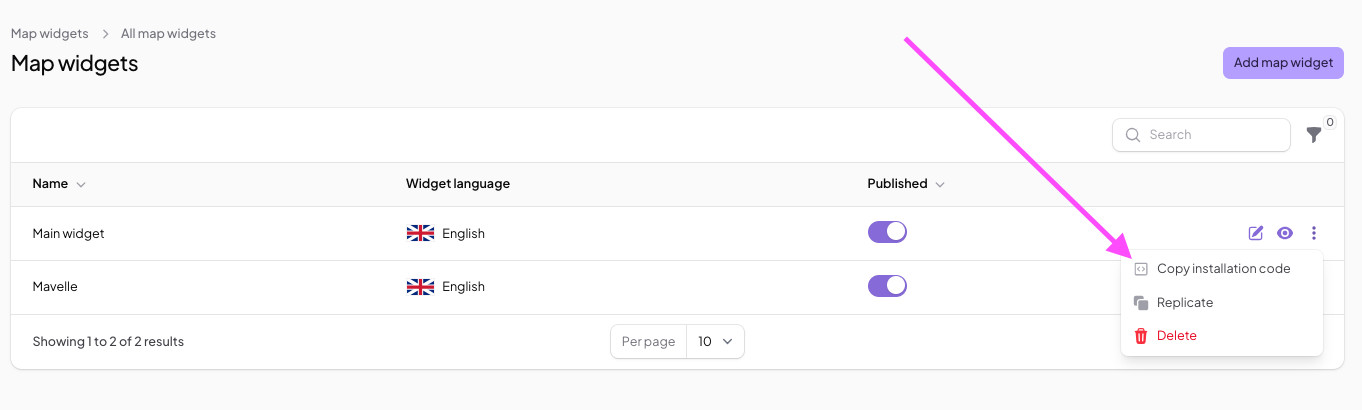
For more detailed instructions on how to set up your MapCosmos widget, check out our guide.
Phase 2: MapCosmos Integration with Jimdo
With your code ready, the final step is to add it to your Jimdo website.
- Select Your Page Log in to your Jimdo account and navigate to the page where you want to display the map.
- Add the HTML Element Hover your mouse over the area where you want your map widget to appear. Click on Add Element and then More elements and Add-ons.
Choose Widget/HTML Element. - Paste the MapCosmos Code A box will appear. Paste the installation code you copied from MapCosmos directly into this box.
- Save and Publish Save your changes. The interactive map will now be live on your Jimdo site.
The Results: A Better Connection with Local Customers
By completing this playbook, you have upgraded your Jimdo site from a simple online brochure to a powerful tool for offline engagement. Your website visitors can find the nearest store in seconds , get one-click directions sent to their phone , and filter your locations by the specific products or services they need. This improved user journey directly encourages more customers to visit you in person, helping to drive local sales.