.avif)

Carrd Store Locator: AI-Powered, SEO-Ready, Zero Code
Everything you need from a Carrd store locator

AI Content Assistant
Stop writing location descriptions by hand. MapCosmos generates engaging, SEO-optimized content for every store, including local keywords, opening hours context, and product highlights, in seconds.

One-snippet embed
Embed your store locator on any Carrd page with a single HTML snippet. No plugins, no developer time, and full compatibility with Carrd's editor.

150+ no-code customization options
Control layout, colors, map styles, filters, fonts, languages, and currencies. Every detail of your store locator can be tailored to match your brand, with no design experience or coding required.

Dedicated SEO pages for every location
Each store gets its own indexed page with AI-generated metadata, schema markup, and local keywords. Your locations start appearing in local search results, driving organic traffic without additional ad spend.

Rich location content and media
Showcase products, services, live reviews, photo galleries, team bios, downloadable menus or flyers, and custom map markers. Turn every location page into a conversion tool, not just a map pin.

Real-time analytics and live data sync
See exactly what customers search for, which locations get the most views, and where drop-off happens. Connect your CRM or inventory system to keep all location data accurate and up to date automatically.
Launch your Carrd store locator today
Join thousands of businesses using MapCosmos on Carrd and other website builders. Start your free trial and have your store finder live in minutes, no coding required.
How to Add a Store Locator to Carrd
Step 1: Craft Your Interactive Map Experience
The first phase of this transformation happens in your MapCosmos dashboard, where you'll build the map that your visitors will use. This process is designed to be quick and intuitive.
For a complete walkthrough of this setup, please refer to our detailed guide on generating the installation code.
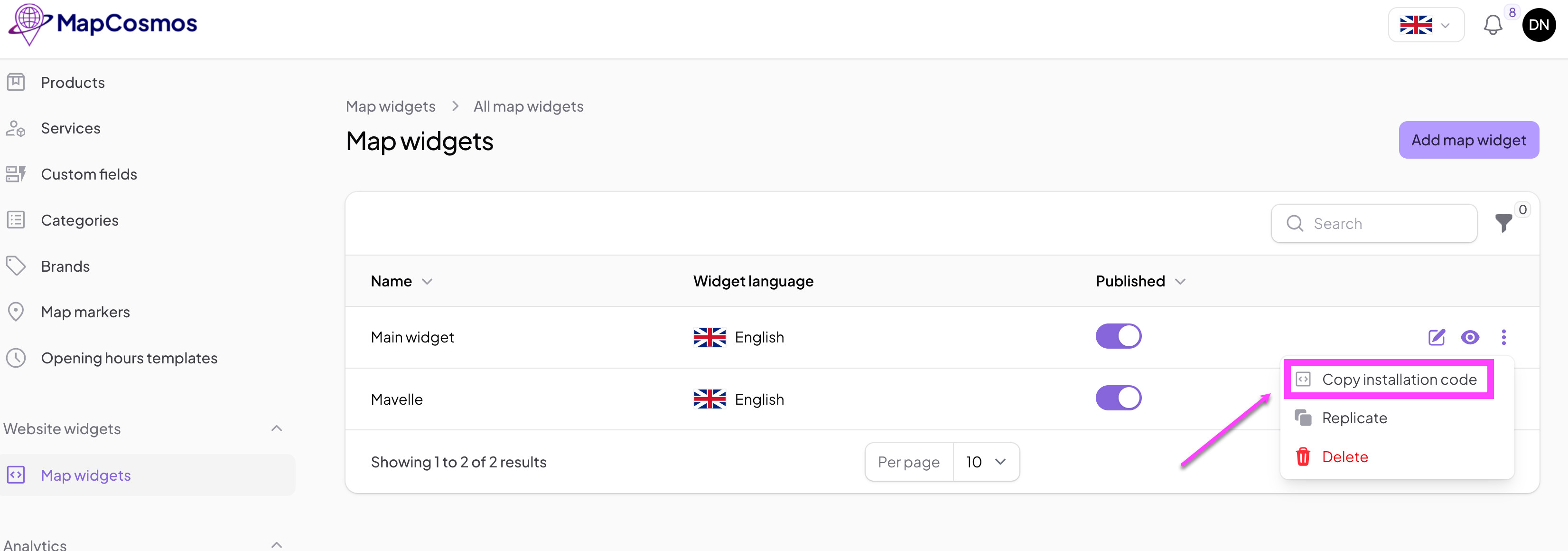
Copy the installation code to clipboard:
Step 2: Add MapCosmos Widget on Carrd
Integrating your new map into your Carrd site takes only a few clicks. Carrd's "Embed" element is built for exactly this purpose.
- Open your Carrd site in the editor.
- Click the plus (+) icon to add a new element.
- Select the Embed element from the list.
- Set the Type to Code.
- In the Code field, paste the installation code you copied from MapCosmos.
- Click Done and publish your site.
That’s it – now your customized MapCosmos widget is visible on your Carrd page.