Integrating a store locator is a high-impact strategy for any business with physical locations. It directly addresses the need to convert online interest into offline action. A store locator transforms your website into a practical tool for your customers, helping them to find your stores, service points, or partner resellers quickly. This functionality is crucial for boosting foot traffic and strengthening trust in your brand. By making it easy for users to find you, you connect your digital presence with your physical one, a key factor in a modern local marketing strategy.
While you could build a geospatial application from the ground up using libraries like GeoDjango, a faster and more efficient method is to use a pre-built, embeddable widget. A solution like the MapCosmos widget provides a dynamic, interactive map that can be integrated into any Django template with a simple copy-paste code snippet. This approach saves significant development time while offering a rich feature set. The widget is built with a focus on customizability, speed, and mobile-first design, ensuring a great user experience on any device.
First, you need to configure your map and generate your unique installation code. This is all done within the MapCosmos platform.
Once you're satisfied with the setup, simply copy the embed code provided in the widget's settings. For a more detailed walkthrough, refer to our comprehensive guide on generating the installation code.
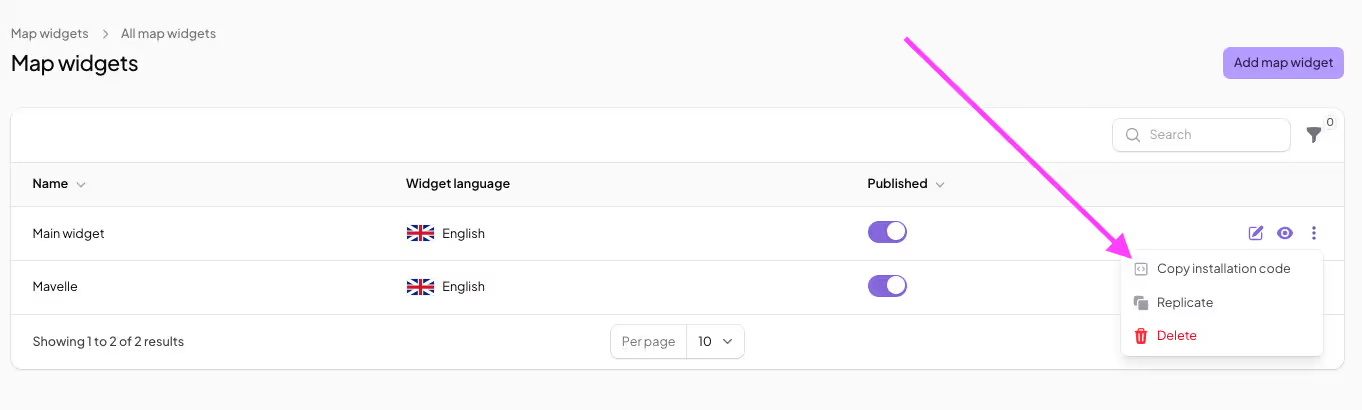
Integrating the code snippet into your Django project involves creating a URL pattern, a view, and a template.
1. URL Configuration: In your app's urls.py, add a path for your store locator page
Python
# your_app/urls.py
from django.urls import path
from . import views

urlpatterns = [
    # ... other urls
    path('find-us/', views.store_locator_view, name='store_locator'),
]
2. View Logic: In your app's views.py, create the view to render the template.
Python
# your_app/views.py
from django.shortcuts import render

def store_locator_view(request):
    return render(request, 'your_app/store_locator.html')
3. Template Integration: Create the store_locator.html file in your templates/your_app/ directory. Paste the MapCosmos embed code into this file.
HTML
{% extends "base.html" %}{% block content %}<h2>Find Our Locations</h2><p>Use the map below to find the location nearest to you.</p>{% endblock %}Your store locator will now be live at the /find-us/ URL.
By embedding the MapCosmos widget, your users will be able to search for nearby locations instantly, get one-click directions through online maps, and filter the results by specific products, services, categories, and more, available at each location. The locator also displays rich details that you can define through custom fields, like accessibility info or special tags ("open 24/7", "pickup") to help customers make informed decisions before they visit.